QosQos|c
Request a demo
THE QOS|C PRODUCT

Run the operation, put work in people’s hands, and follow the result with evidence.

Qos|c brings advanced audits, documents, learning, maintenance, resources, sustainability, communication and external collaboration into one software product. Managers keep operational depth; employees complete the work in front of them through a clear flow.

ACTUAL PRODUCT FLOWS

What does Qos|c do in daily operations?

These QosDemo screens show how daily work moves through visibility, knowledge authoring, employee delivery, management read-back, field recording, verification and message-linked tasks. The examples come from hospitality; the product model is multi-sector.

Actual QOS interfaces · Fully synthetic QosDemo data

01 · OPERATIONAL VISIBILITY

One place for every owner, status and next action.

Planned, in-progress, verified and blocked work stays visible in one workspace. Teams can see who owns the work and where it is stuck without reconstructing the operation from message threads.

Shared visibility for management; clear ownership for teams.

QOS workspace showing planned, in-progress, verified and blocked operational actions
Action workspace · Multi-team operational view
02 · FROM SOURCE TO CONTROLLED DOCUMENT

Bring operational knowledge into a controlled document draft.

Document Studio uses a permitted Thread record as its source. The source link and draft content remain visible to the user; the publishing decision stays with the user and the controlled document lifecycle.

Knowledge does not disappear in conversation; it becomes source-linked document work.

QOS Document Studio showing an English operating procedure draft created from a Thread source
Document Studio · Thread source · Human-controlled draft
03 · DELIVERY TO THE EMPLOYEE FLOW

Put the document to read directly into the employee’s daily flow.

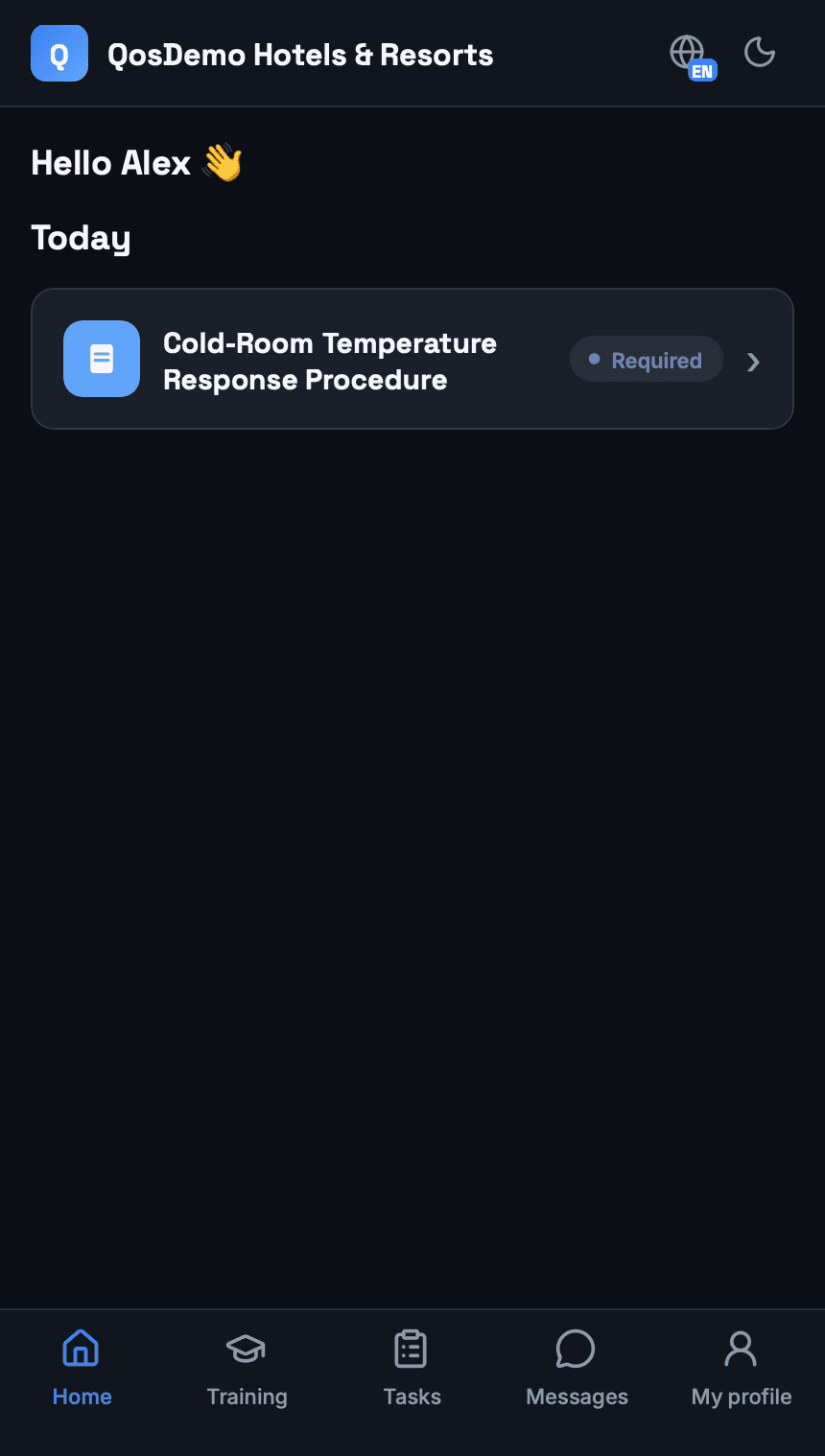
The published version reaches the right employee as a required task on the Employee Portal home screen. The employee does not have to search through complex folders and menus to find it.

Management retains controlled distribution; the employee sees the required work in front of them.

QOS Employee Portal home screen showing an English document reading task as required
Employee Portal · Required document task · Synthetic demo
04 · DISTRIBUTION READ-BACK

Follow the published version’s distribution state on the same document.

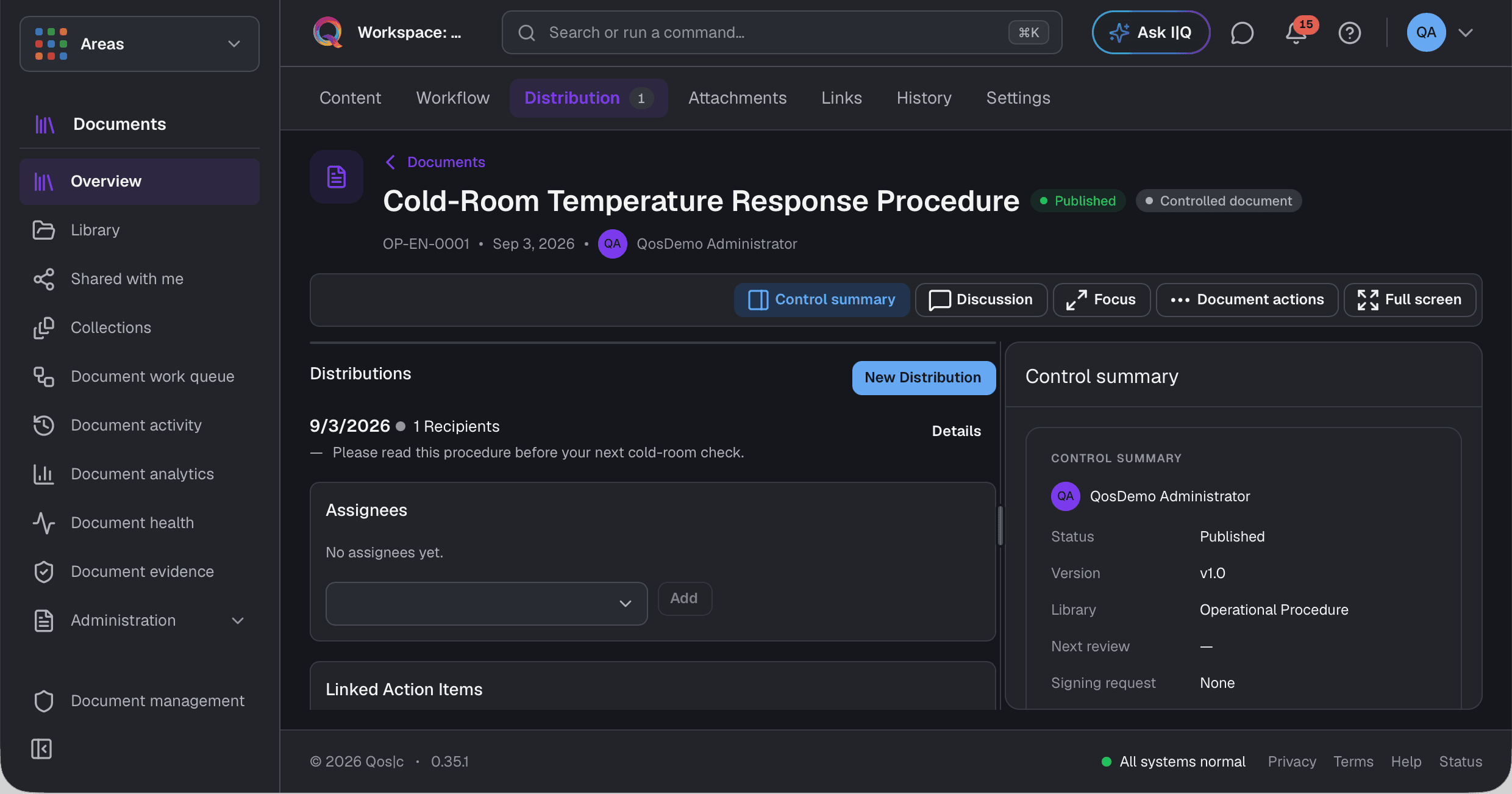
The document manager can read back the distribution date, recipient count, message and read or acknowledgement proof state tied to the published version.

The employee task and the management-side distribution remain in the same document and version context.

QOS document management screen showing an English distribution date, recipient count, message and read proof state
Document distribution · Version-bound management read-back
05 · FIELD RECORD

Turn a field check into a locked operational record.

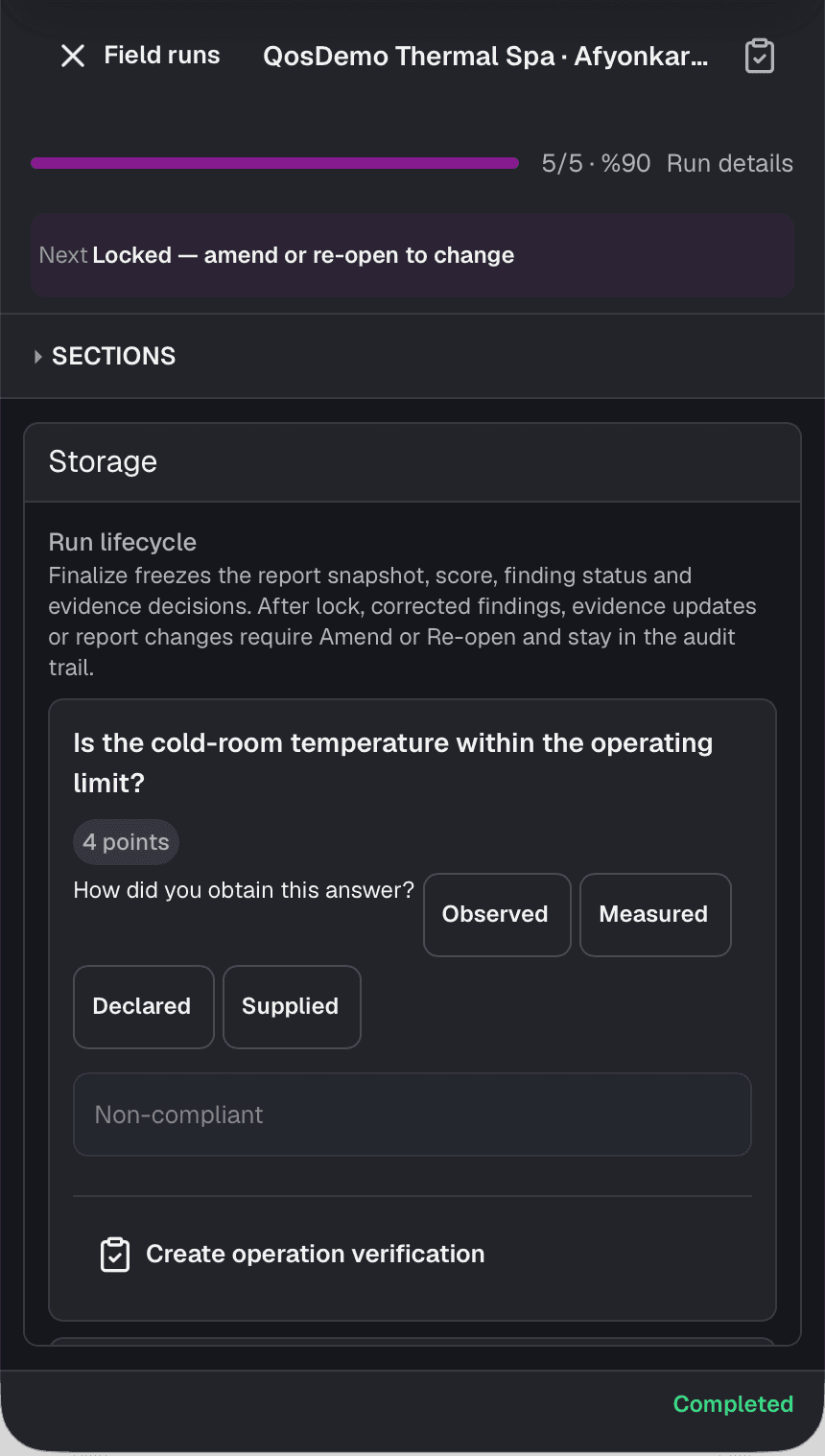
The operator runs the check on a phone, records whether the answer was observed or measured, and moves an out-of-limit result into operational verification.

Field reality becomes a traceable record instead of a message interpreted later.

QOS mobile field screen with a locked cold-room check and observed or measured source choices
Mobile field execution · Hospitality entry scenario
06 · EVIDENCED CLOSURE

Do not close evidence-required work before verification.

An evidence-required action keeps its attached file, completion state and verified workflow together. In the synthetic cold-room example, the post-service measurement file remains on the work record.

Completion and verification remain explicit, separate facts.

Verified and completed cold-room action in QOS with one attached closure evidence file
Verified action · One attached evidence file · Synthetic demo
07 · FROM MESSAGE TO TASK

Turn a message into a task without losing the conversation.

Create a follow-up task from a message in Loop. A link to the task appears below the message, so the team can open the work while reading the conversation.

Keep the conversation and its follow-up in one product.

English QOS Loop conversation showing the Task created from this message card and Open task link below the source message
Loop · Synthetic demo · Task not yet completed
08 · FROM TASK TO CONVERSATION

Go back to the source conversation from the task.

The task’s Links pane shows the source channel and a message excerpt. Open the conversation to read the decision and discussion behind the task.

The task stays connected to why it was created.

English QOS open task showing its source channel, message excerpt and Open source conversation link in the Links pane
Task links · Synthetic demo · Task not yet completed
PRODUCT CAPABILITIES

The parts your operation needs, in one product instead of disconnected tools.

Qos|c does more than store records. It keeps the setup of work, delivery to the right person, field completion and evidenced outcome in the same operating context.

01 · DAILY WORK AND EVIDENCE

Run tasks, actions and verification on the same work record.

Tasks, action items, work orders, corrective activities and approvals retain their owners and states instead of spreading across separate trackers.

  • Owner, priority, due date, state and source context
  • Evidence-required completion with a separate verification step
  • A personal mobile flow where employees can add note, photo or voice evidence

Direct valueManagement follow-up and employee action rely on the same current record.

02 · AUDITS AND FIELD INSPECTIONS

Manage the audit from planning through field record and report.

Checklists, auditor and location planning, mobile execution, findings, reports and scorecards work on one audit foundation.

  • Versioned templates, scheduling, auditor and site assignment
  • Mobile execution with observed or measured source, attachments and findings
  • Report editing, finding follow-up, scorecards and template analytics

Direct valueWhat happened in the field becomes a locked record instead of a summary rewritten later.

03 · DOCUMENTS, KNOWLEDGE AND LEARNING

Create and publish controlled knowledge, then deliver it into the employee’s work.

The document lifecycle in Document Studio works in the same product as learning content, assignments and competence tracking.

  • Templates, libraries, numbering, versioning, review, approval and publication
  • Source-linked document drafts from permitted communication and operating records
  • Employee read/acknowledge tasks; human-reviewed learning proposals from document versions, lessons, quizzes, certificates and competence

Direct valuePeople do not search through complex folders; assigned content reaches their personal flow.

04 · MAINTENANCE, ASSETS AND VISUAL SPACE

See maintenance work together with the asset’s actual location and history.

Site, zone, area and asset structure connects to visual plans, maintenance programs, work orders, calibration and evidence records.

  • Area geometry and selectable asset placements on a plan
  • Planned or breakdown maintenance, program calendar, work plans and work orders
  • Asset location, meters, maintenance history, calibration and related evidence

Direct valueThe team sees not only the work order, but where the work is and which asset it concerns.

05 · RESOURCES AND SUSTAINABLE OPERATIONS

Connect people, equipment, materials and consumption records to the work.

The resource requirement and usage lifecycle works with crews, competence, tools, spares, materials, meters and sustainability records.

  • Requirement, reservation, allocation, substitution, usage, completion and failure records
  • Crew, person competence, tools, spares, commodities and inventory context
  • Meter readings, consumption, thresholds and sustainability sources linked to activity and evidence

Direct valueThe resources behind planned work and the location of consumption become clearer.

06 · ASSESSMENTS AND IMPROVEMENT

Run an assessment with its method, scope, evidence and decisions intact.

The Assessment workspace keeps methodology, evaluated scope, sources, decision areas and related improvement work in one context.

  • Versioned methodology and explicit assessment scope
  • Sources, evidence, claims and decision areas read together
  • Progression into findings, risks, objectives, actions and verification

Direct valueThe result does not become a score detached from its source and method.

07 · COMMUNICATION AND PORTALS

Turn conversation into action and give each user the right experience.

Announcements, messaging and meeting decisions connect to operating records. Employees, clients and suppliers use experiences designed around their own work.

  • A task, action, work order or corrective activity from a message or meeting decision
  • Documents, learning, forms, announcements and daily work for employees
  • Scoped shares, requests, uploads and status views for clients and suppliers

Direct valueCommunication does not remain a separate archive; it stays linked to the work and parties involved.

08 · ANALYTICS, AI AND CONTROL

Interpret operational data without losing sources, authority or human decisions.

Reports, scorecards, trends and operating views work alongside source-linked AI proposals and human approval.

  • Reporting and analysis surfaces for audits, documents, learning, processes, maintenance and consumption
  • Source-visible drafts and proposals with accept, reject, edit and approval steps
  • Role and workspace scope, version history, audit trail and evidence links

Direct valueTeams gain speed while retaining who decided and which information the decision relied on.

Capability visibility is shaped by each user’s role, authority, workspace and the organization’s configured operating scope.

THE RIGHT WORK FOR EACH PERSON

Depth for management, a clear daily flow for employees.

QOS does not force every person through the same complex menu. Each role sees the surface required for its work.

MANAGER

Configure and follow the operation in detail.

Manage workspaces, authority, processes, owners, states and evidence.

EMPLOYEE

Complete the work in front of you from a phone.

See assigned documents, learning, forms, announcements and work in a personal timeline; completed items leave the active flow.

CLIENT

Reach the records that concern you.

Follow documents, reports, findings and states shared with you through a separate client experience.

SUPPLIER

Provide requested information and evidence directly.

Follow document requests, assessments, uploads and your own status through the supplier portal.

ONE PRODUCT BACKBONE

As capabilities grow, the operating context does not fragment.

The difference is not only the number of capabilities. A shared user, authority, workspace, record and evidence model lets them work together.

Shared work context

Source, owner, state, location and related records stay intact as work progresses.

Role and workspace scope

People see only the organization, workspace and operating surfaces they are authorized to use.

Multi-location structure

Head office, sites, zones, teams and assets remain part of the same operation.

Version and approval control

Controlled content and decisions move through draft, review, approval and publication.

Evidence and record trail

Completion, verification, attachments and change history stay with the relevant work.

Purpose-built role experiences

Management depth remains available while employees and external parties see only their own work.

AI, TRUST AND HUMAN CONTROL

AI proposes; an authorized person decides.

QOS uses AI as a source-aware assistant that accelerates work, not as a general slogan.

01

Sources stay visible

Permitted knowledge and work context behind a suggestion remain available.

02

People stay in control

Drafts and suggestions pass through accept, reject, edit and approval steps.

03

Authority and trace

Who viewed, changed, published or verified a record remains on the record.

SEE QOS IN YOUR OWN OPERATION

Let us run one of your real workflows through QOS.

We will first clarify where QOS fits in your operation, then use the demo to examine your workflow rather than giving you a generic feature tour.

Request a demoExplore the product